During internal audits, the same finding comes up regularly: a network where everything looks clean on the IPv4 side, with firewalls in place, segmented VLANs and patches applied. And yet a single workstation can be enough to take over the entire domain in under an hour. Among the most discreet entry points in this situation, one stems from a protocol that almost nobody monitors: IPv6, enabled by default on Windows and left unconfigured. This article walks through the mitm6 attack step by step, with the context that explains why it remains so effective years after it was published.
IPv6: the protocol nobody configures
Since Windows Vista, IPv6 has been enabled by default on every workstation and every server. Better (or worse, depending on the point of view), the Windows network stack prefers IPv6 over IPv4. This preference is not arbitrary: it follows from RFC 6724, which defines the address selection order. In practice, when a machine boots or renews its configuration, it broadcasts solicitations to discover a router and an addressing server: Router Solicitation messages and DHCPv6 requests. In almost every corporate network nobody answers, because no IPv6 service has ever been deployed. The workstation therefore keeps waiting, with no IPv6 gateway or DNS server, until the day an attacker is only too happy to provide one.
As a reminder, a DNS server translates readable names (such as fichiers.entreprise.local) into network addresses. Whoever controls a machine’s DNS largely controls what it connects to, and can therefore steer it towards servers of their choosing.
This situation, a protocol switched on but never administered, creates exactly the gap an intruder steps into. The research behind the attack, published by researcher Dirk-jan Mollema, showed that simply answering these solicitations politely was enough to insert a rogue machine at the heart of the traffic.
mitm6: impersonating the DNS server
The mitm6 tool listens on the network segment and answers these unanswered solicitations. It assigns the Windows workstation an IPv6 address and, above all, announces itself as the machine’s IPv6 DNS server through a DHCPv6 reply. Since Windows favours IPv6, the workstation switches over at once: it now sends its name resolution requests to the attacker rather than to the domain’s legitimate DNS.
mitm6 -d entreprise.localThe -d option restricts the poisoning to the target domain, to stay discreet and avoid disrupting the whole network. From then on, the attacker answers resolutions with their own addresses and captures the automatic authentications that Windows constantly sends to internal servers, without any user action whatsoever.
WPAD: the accomplice that triggers authentication
What remains is to trigger an exploitable authentication. This is where WPAD (Web Proxy Auto-Discovery) comes in, a mechanism through which browsers and many Windows components automatically look for a proxy configuration file on the network. mitm6 answers the request for wpad, serves a fake configuration file, and the workstation then attempts to authenticate to the rogue proxy. Windows spontaneously sends the logged-on user’s identity, as an NTLM authentication, without ever asking for confirmation.
Put simply: the user clicks nothing and types no password. The workstation offers up its identity of its own accord to the first server that politely asks for it.
NTLM relay: from eavesdropping to takeover
Intercepting DNS and harvesting an authentication is not yet enough. The second building block, and the most decisive one, is NTLM authentication relay, carried out with ntlmrelayx, a tool from the Impacket suite. The principle is elegant and formidable: instead of trying to crack a password, the attacker relays the received authentication, as is, to an Active Directory service, typically the LDAP service of a domain controller. This replay is only possible, however, if the target service does not enforce signing of its exchanges: without LDAP (or SMB) signing, nothing binds the authentication to the legitimate server and the attacker can replay it elsewhere. A forthcoming article will cover these signing mechanisms and how they shut down NTLM relay.
ntlmrelayx.py -6 -t ldaps://dc.entreprise.local -wh attaquant-wpad --delegate-accessPut simply: the target machine believes it is talking to a legitimate server, but is actually talking to the attacker, who immediately replays that identity against the directory, with all the rights that come with it.
Depending on the privileges of the relayed identity, the impact escalates:
- reading the entire Active Directory, including the map of groups and administrators;
- creating a new computer or user account fully controlled by the attacker;
- configuring rights delegation (via the msDS-AllowedToActOnBehalfOfOtherIdentity attribute) to impersonate other accounts, sometimes all the way up to domain administrator.
All of this without exploiting a single software vulnerability: only native Windows features diverted from their intended use. No security patch “fixes” this behaviour, because it is how the protocol is designed to work.
How the attack unfolds during an internal audit
Carried out during an internal audit, this IPv6 attack almost always unfolds the same way. A machine is plugged into a network socket in an open-plan workspace, often an accessible meeting room. mitm6 starts and, within minutes, the first workstations booting up or waking from sleep switch their DNS. ntlmrelayx collects the incoming authentications and relays them to a domain controller. If just one of these authentications belongs to an account with write rights on the directory, the game is over: enough to create an account, set up a delegation and, step by step, climb to domain administration rights. Throughout, everything stays passive from the user’s point of view, and the user keeps working without noticing a thing.
The business impact is on the same scale: compromising a domain controller means controlling access across the whole organisation, being able to read file shares, deploy ransomware at scale or exfiltrate data. A poorly segmented network socket in a reception area then becomes the starting point of a major incident.
Detecting the attack on the network
These exchanges leave characteristic traces: a workstation that suddenly starts handing out IPv6 configurations, unexpected Router Advertisement messages, a DHCPv6 server appearing where there has never been one, a stream of authentications relayed to the domain controllers. The Oxyscan BOX monitors these signals directly on the network and reports the appearance of an illegitimate DHCPv6 or IPv6 DNS server, a strong indication that an mitm6-type attack is under way. Deployed continuously, it identifies, across an entire estate, the machines exposed to this type of interception. Detecting this set-up phase early means cutting the attack off before the first successful relay.
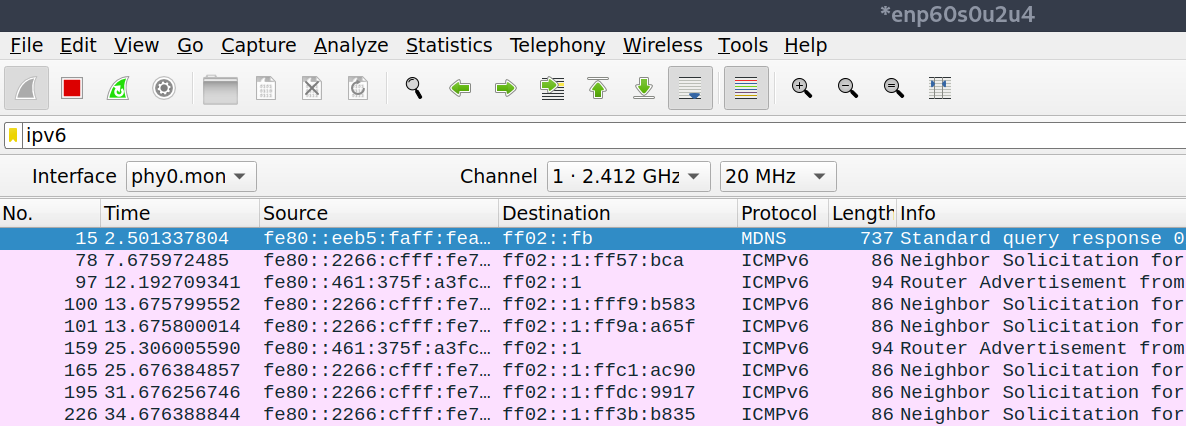
On the network, these messages are visible in a capture: as soon as the tool goes into action, ICMPv6 router advertisements and neighbour solicitations multiply.
Fixing the weakness: neutralising IPv6 without disabling it
The first reaction, simply switching IPv6 off altogether, is rarely the right one. Microsoft advises against fully disabling it, because Windows is tested with IPv6 enabled and some components (Exchange, failover clusters) may misbehave without it. The goal is therefore not to remove IPv6, but to prevent a workstation from accepting an IPv6 configuration handed out by an unknown party.
The cleanest measure is to block, through Windows Firewall deployed by GPO across the whole domain, the two building blocks the attack needs: DHCPv6 replies and router advertisements. Three predefined rules are set to Block:
- (Inbound) Core Networking, Dynamic Host Configuration Protocol for IPv6 (DHCPV6-In), UDP port 546;
- (Inbound) Core Networking, Router Advertisement (ICMPv6-In), ICMPv6 type 134;
- (Outbound) Core Networking, Dynamic Host Configuration Protocol for IPv6 (DHCPV6-Out).
This configuration neutralises the attack while keeping link-local IPv6 addresses, so it has no side effects on Windows components.
On the network side, the RA Guard and DHCPv6 Guard features on switches complement this: they block at the edge router advertisements and DHCPv6 replies sent from an unauthorised port, and also protect Linux and macOS machines that Windows hardening does not cover. On these systems, router advertisements can also be refused locally (for example
sysctl net.ipv6.conf.all.accept_ra=0on Linux).
One variant is to give IPv4 priority over IPv6, which strips the configuration handed out by the attacker of its precedence over the legitimate configuration. This setting can also be deployed by GPO, via a registry preference:
HKLM\SYSTEM\CurrentControlSet\Services\Tcpip6\Parameters
DisabledComponents = 0x20 (DWORD 32 bits)
Only as a last resort, if an internal policy requires IPv6 to be fully disabled, is this done by PowerShell on each machine. The same family of commands can also be used to check the protocol’s status on the network adapters:
Disable-NetAdapterBinding -Name "*" -ComponentID ms_tcpip6
This method, however, only covers existing network adapters and cannot be deployed natively by GPO, unlike the previous two. Finally, whichever option is chosen, SMB signing, LDAP signing and LDAP channel binding remain essential: even if a workstation were to be fooled, these protections prevent reuse of the intercepted authentication, and therefore the relay that is the whole point of the attack.
Conclusion
mitm6 illustrates a principle borne out on every engagement: a feature enabled by default and never configured remains an attack surface in its own right. IPv6 is not dangerous in itself; neglecting it is. A few targeted measures close the gap without breaking anything already in place, and most have long been recommended by ANSSI in its Active Directory hardening guides.
Recommendations: disable IPv6 on workstations only if it is not used (and cleanly, via Group Policy, rather than through improvised tinkering), enable DHCPv6 Guard and RA Guard on switches to block rogue advertisements, enforce LDAP signing and channel binding (Extended Protection for Authentication) on domain controllers to render any relay ineffective, and segment network sockets accessible to the public.
Further reading
- Oxydian cybersecurity consulting and support, to deploy the countermeasures (RA Guard, DHCPv6 Guard, SMB and LDAP signing) without breaking anything already in place.
- The article on Kerberoasting, where offline cracking targets Active Directory service accounts.
- MITRE ATT&CK, technique T1557 (Adversary-in-the-Middle), the reference that classifies and documents interception and relay attacks.
- ANSSI, guides on securing Active Directory and hardening Windows.
- Dirk-jan Mollema’s mitm6 project, the research and tool behind the technique.
- Impacket suite (ntlmrelayx), the open source toolkit used for NTLM relay.
- Microsoft Learn, enabling LDAP signing on domain controllers.