The same scene plays out in every internal audit: as soon as the Active Directory password database has been retrieved, a large share of it falls within minutes, sometimes a few hours. Not thanks to miraculous hardware, but because the chosen passwords are, quite simply, guessable. This article explains why these secrets give way so quickly, which habits an audit actually exploits, and above all how to reverse the trend.
Guessing rather than forcing
Contrary to the image of a hacker trying billions of random combinations, an auditor works mainly by anticipation. The starting point is a dictionary of passwords already seen (public leaks, common words, first names, sports team names), to which mutation rules are applied to reproduce human reflexes: a capital letter at the start, a digit at the end, a special character to “look serious”. This approach is vastly faster than pure brute force, because it follows the same paths as most users.
As a reminder, a stolen password database does not contain the passwords in clear text but their fingerprint (a hash), the result of a one-way calculation. The attacker guesses a word, computes its hash and compares it with those in the database. Everything happens on the attacker’s own machine, without ever querying the target system, so there is no alert and no lockout.
The result: the usual suspects fall immediately. The company name followed by a year, a season, a town with its postcode, all topped off with a final “!” to satisfy the famous complexity rule:
Company2024!
Spring2025
Welcome1
Paris75015
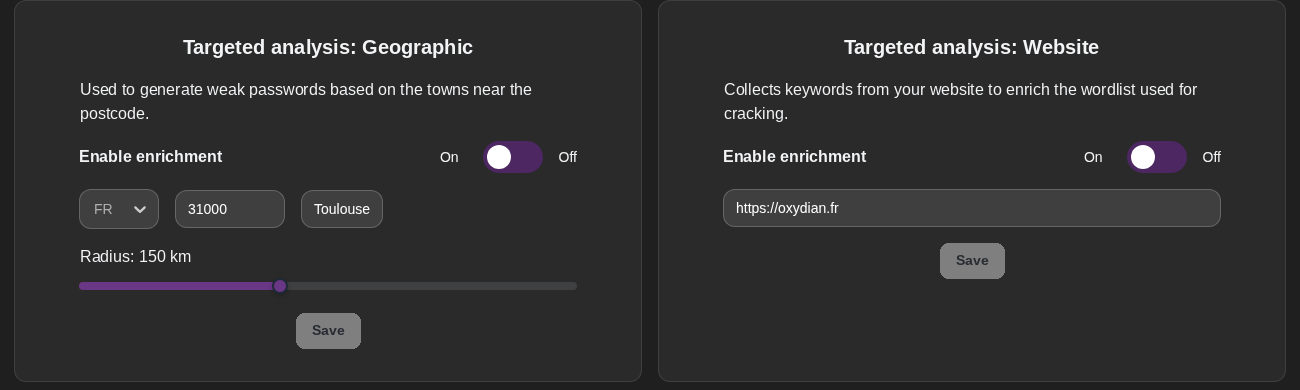
This dictionary is anything but generic: it adapts to the context of the audited organisation, starting with its geography. The town name and the site’s postcode, like Paris75015 above, come up so often that they are among the first candidates tested. The Oxyscan BOX automates this tuning: the geographical area of the audit is entered, and the cracking engine derives the local variants (neighbouring municipalities, towns, postcodes) to test first.
Where the cracked hashes come from
A question that often comes up: how is this hash database obtained? On a Windows domain, all account hashes are stored in a single file, the NTDS.dit database, present on every domain controller. An attacker who gains privileged access extracts a copy of it, then works on it at leisure, offline. This is precisely why good password hygiene remains essential even when the rest of the system appears well protected: the day this database leaks, only strong passwords still hold.
The real problem: entropy
Entropy measures how unpredictable a password is. A long but predictable password (a dictionary word with obvious substitutions) has low entropy: it looks complicated to a human, but not to a computer testing billions of candidates by following exactly the same predictable patterns. Conversely, four unrelated words picked at random offer much higher entropy while remaining memorable.
Put simply: length matters more than odd characters. Horse!Stapler7Jar is far better than P@ssw0rd, and is easy to remember. An attacker guesses the second in a fraction of a second and is stuck for years on the first.
This is also the approach taken by the official frameworks. NIST, in its SP 800-63B publication, and ANSSI in its recommendations now put length and checking against known leaks first, rather than the old enforced complexity rules which, in practice, mostly produce predictable passwords.
The bad habits that get exploited
Beyond individual weak passwords, it is above all collective habits that bring organisations down:
- reuse of the same password across several accounts, both professional and personal: one leak elsewhere and the whole company is exposed (the well-known credential stuffing);
- seasonal variants caused by overly frequent rotation, which mechanically turns Summer2024 into Autumn2024 and then Winter2025;
- default passwords never changed on a network device, a service account or freshly installed software;
- shared company patterns, where everyone knows the “house recipe” for building a password.
These habits are all the more dangerous because they remain invisible in conventional indicators: a policy can report “100% compliant passwords” while being massively crackable.
What actually works
Good password hygiene need not be a burden if it is well targeted. The following recommendations are field-proven and aligned with the official frameworks:
- favour long passphrases over convoluted strings of characters;
- deploy a password manager so that every account has a unique secret that nobody needs to memorise;
- enable multi-factor authentication wherever possible: a cracked password is then no longer enough to get in;
- ban already compromised passwords by checking them against public leak dictionaries (a service such as HaveIBeenPwned makes this check possible);
- stop systematic rotation every 90 days, which encourages predictable variants, and require a change only when compromise is suspected.
On the Active Directory side, several of these measures can be tooled directly: filters forbidding banned terms, a higher minimum length, checks against leak lists. An audit highlights precisely the proportion of accounts with weak or reused passwords, which makes it possible to prioritise remediation where the risk is real.
Conclusion
If so many passwords fall during audits, it is not through technical prowess: it is because the same patterns turn up everywhere. The good news is that the reverse is also true. A few simple rules, consistent with NIST and ANSSI guidance, are enough to move an organisation from easy target to costly, and therefore unattractive, target.
Recommendations: focus on length with passphrases, assign a unique secret per account via a password manager, enable multi-factor authentication everywhere, and adopt an Active Directory policy that bans compromised passwords rather than enforcing changes that are as frequent as they are pointless.
Further reading
- Oxydian cybersecurity consulting and support, to define and tool a password policy aligned with the frameworks (passphrases, multi-factor authentication, banning leaked passwords).
- The article on Kerberoasting, where offline cracking targets Active Directory service accounts.
- NIST SP 800-63B, Digital Identity Guidelines (Authentication), the official guidelines on passwords and authentication.
- ANSSI, recommendations on passwords and multi-factor authentication.
- MITRE ATT&CK, technique T1110.002 (Password Cracking), offline hash cracking.
- Have I Been Pwned, a public service for checking whether a password appears in a known leak.
- Microsoft Learn, banned password protection (Password Protection).